Your on-screen designs might call for a chart background. However, when printed, those will wasted a lot of ink. This tutorial will explain how to disable chart’s background when using Export’s Print option.
Let’s use a chart with a nice gradient as a background.
* ---------------------------------------
* This demo was created using amCharts 4.
* For more information visit:
* https://www.amcharts.com/
* Documentation is available at:
* https://www.amcharts.com/docs/v4/
* ---------------------------------------
am4core . useTheme ( am4themes_animated );
var chart = am4core . create ( " chartdiv " , am4charts . XYChart );
category: " Distribution " ,
var categoryAxis = chart . xAxes . push ( new am4charts . CategoryAxis ());
categoryAxis . dataFields . category = " category " ;
categoryAxis . renderer . grid . template . location = 0 ;
//categoryAxis.renderer.minGridDistance = 30;
var valueAxis = chart . yAxes . push ( new am4charts . ValueAxis ());
var series = chart . series . push ( new am4charts . ColumnSeries ());
series . dataFields . valueY = " value " ;
series . dataFields . categoryX = " category " ;
chart . background . fill = chart . colors . getIndex ( 2 );
var fillModifier = new am4core . LinearGradientModifier ();
fillModifier . opacities = [ 0 , 0.2 , 0.3 , 0.2 , 0 ];
fillModifier . offsets = [ 0 , 0.2 , 0.5 , 0.8 , 1 ];
fillModifier . gradient . rotation = 90 ;
chart . background . fillModifier = fillModifier ;
chart . exporting . menu = new am4core . ExportMenu ();
< div id = " chartdiv " ></ div >
-apple-system , BlinkMacSystemFont, " Segoe UI " , Roboto, Helvetica , Arial , sans-serif ,
" Apple Color Emoji " , " Segoe UI Emoji " , " Segoe UI Symbol " ;
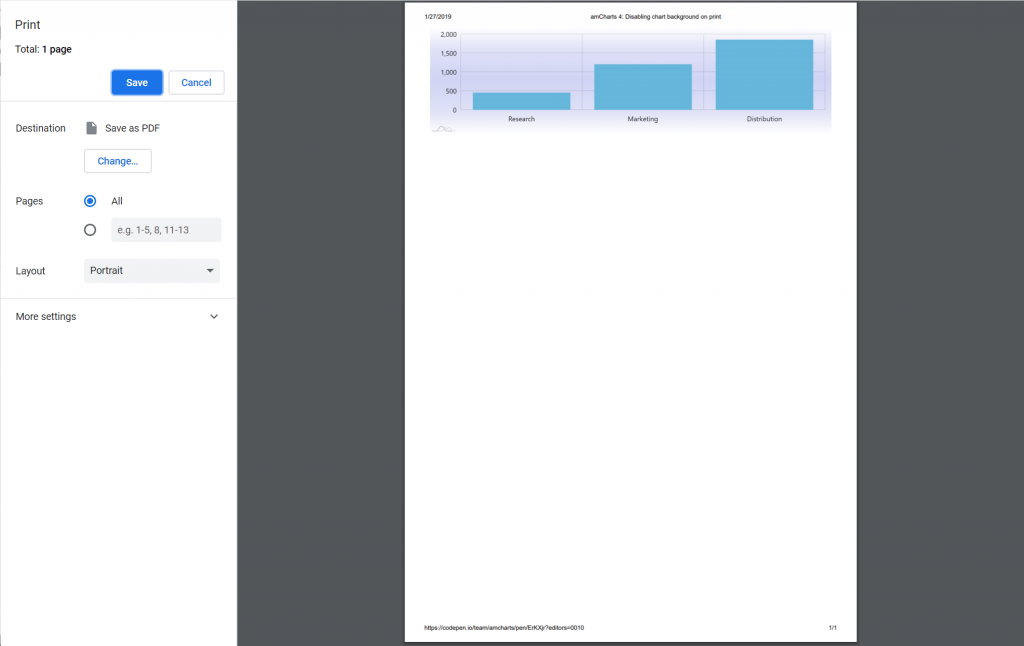
Disabling chart background on print disabling-chart-background-on-printNow, when we try to print it, the background carries over:
To solve the issue, we need to briefly disable background when printing operation starts and bring it back when it finishes.
For that we are going to be using Export’s exportstarted and exportfinished events.
Additionally, we will have to check if it’s a print operation, so that saving to images is not affected.
chart . exporting . events . on ( " exportstarted " , function ( ev ) { if (ev . format == " print " ) { chart . background . visible = false ; } }); chart . exporting . events . on ( " exportfinished " , function ( ev ) { if (ev . format == " print " ) { chart . background . visible = true ; } });
chart . exporting . events . on ( " exportstarted " , function ( ev ) { if ( ev . format == " print " ) { chart . background . visible = false ; } }); chart . exporting . events . on ( " exportfinished " , function ( ev ) { if ( ev . format == " print " ) { chart . background . visible = true ; } });
{ // ... "exporting": { // ... "events": { "exportstarted": function(ev) { if (ev.format == "print") { chart.background.visible = false; } }, "exportfinished": function(ev) { if (ev.format == "print") { chart.background.visible = true; } } } }}
* ---------------------------------------
* This demo was created using amCharts 4.
* For more information visit:
* https://www.amcharts.com/
* Documentation is available at:
* https://www.amcharts.com/docs/v4/
* ---------------------------------------
am4core . useTheme ( am4themes_animated );
var chart = am4core . create ( " chartdiv " , am4charts . XYChart );
category: " Distribution " ,
var categoryAxis = chart . xAxes . push ( new am4charts . CategoryAxis ());
categoryAxis . dataFields . category = " category " ;
categoryAxis . renderer . grid . template . location = 0 ;
//categoryAxis.renderer.minGridDistance = 30;
var valueAxis = chart . yAxes . push ( new am4charts . ValueAxis ());
var series = chart . series . push ( new am4charts . ColumnSeries ());
series . dataFields . valueY = " value " ;
series . dataFields . categoryX = " category " ;
chart . background . fill = chart . colors . getIndex ( 2 );
var fillModifier = new am4core . LinearGradientModifier ();
fillModifier . opacities = [ 0 , 0.2 , 0.3 , 0.2 , 0 ];
fillModifier . offsets = [ 0 , 0.2 , 0.5 , 0.8 , 1 ];
fillModifier . gradient . rotation = 90 ;
chart . background . fillModifier = fillModifier ;
chart . exporting . menu = new am4core . ExportMenu ();
chart . exporting . events . on ( " exportstarted " , function ( ev ) {
if ( ev . format == " print " ) {
chart . background . visible = false ;
chart . exporting . events . on ( " exportfinished " , function ( ev ) {
if ( ev . format == " print " ) {
chart . background . visible = true ;
< div id = " chartdiv " ></ div >
-apple-system , BlinkMacSystemFont, " Segoe UI " , Roboto, Helvetica , Arial , sans-serif ,
" Apple Color Emoji " , " Segoe UI Emoji " , " Segoe UI Symbol " ;
Disabling chart background on print disabling-chart-background-on-print-2